Sws101_flippedclass6
Topic: Assembly Language
Introduction
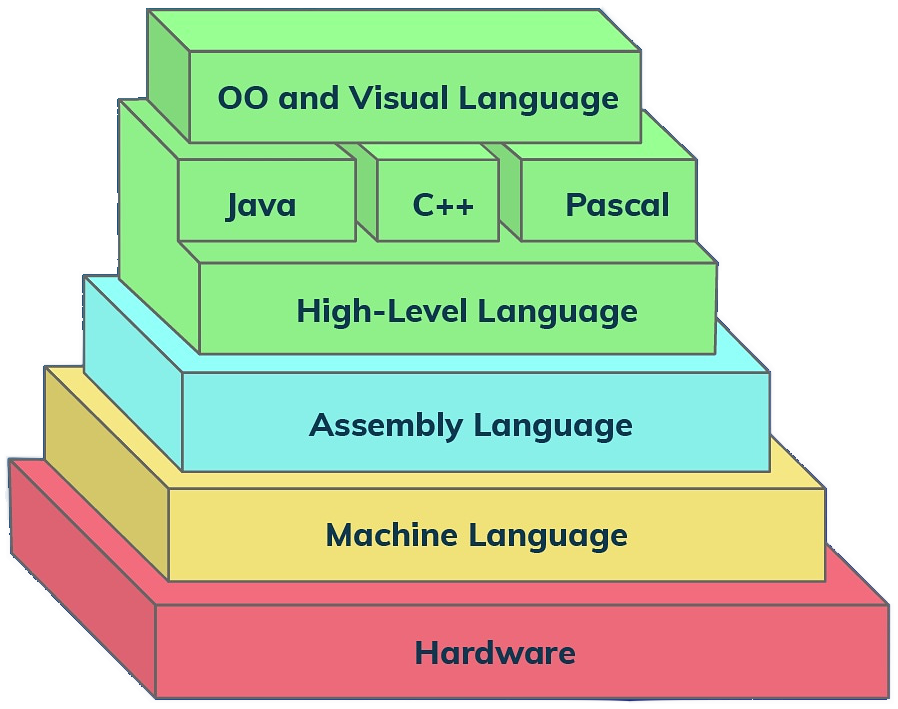
Assembly language is a low-level programming language used to write programs that interact directly with a computer’s hardware. Assembly language allows programmers to work directly with the hardware of a computer, manipulating various levels of abstraction such as processor registers and machine code instructions. This enables achieving high execution efficiency of programs and precise control over devices.
x86 assembly language is a family of low-level programming languages that are tied to the x86 instruction set architecture (ISA). This means that programs written in x86 assembly language are closely related to the underlying hardware, making them particularly useful for tasks that require fine-grained control over the computer’s operation.
There are several different assembly languages for generating x86 machine code. The one I am going to use is NASM.
The Netwide Assembler (NASM) is an assembler and disassembler for the x86 architecture. It can be used to create programs written in x86 assembly language by converting your assembly code into machine code that can be executed by the CPU. NASM has a simple syntax and supports a wide range of output formats, making it a popular choice for x86 assembly development.
Installing NASM
Check whether NASM is already installed or not.
- Open a Linux terminal.
- Type whereis nasm and press ENTER.
- If it is already installed, then a line like, nasm: /usr/bin/nasm appears. Otherwise, you will see just nasm:, then you need to install NASM.
Command to install NASM in linux is : sudo apt install nasm
Basic Syntax
An assembly program can be divided into three sections;
- The data section
- The text section
- The bss section
The data Section
The data section is used for declaring initialized data or constants.
The syntax for declaring data section is: section.data
The text section
The text section is used for keeping the actual code. This section must begin with the declaration global _start, which tells the kernel where the program execution begins.
The syntax for declaring text section is:
section.text
global _start
_start:
The bss Section
The bss section is used for declaring variables.
The syntax for declaring bss section is : section.bss
Comments
Assembly language comment begins with a semicolon (;)
Now let’s write hello World program in assembly language
Step1
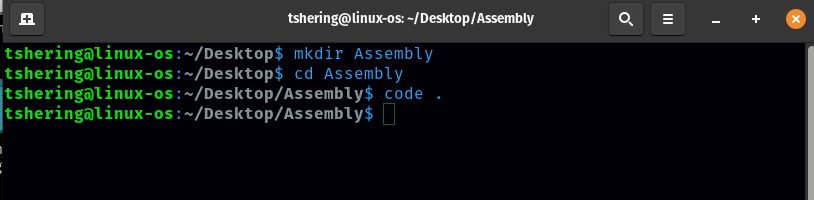
Open a terminal and create a directory and then open that directory in vscode.
Step2
Now create a file with .asm extension and paste the following code. 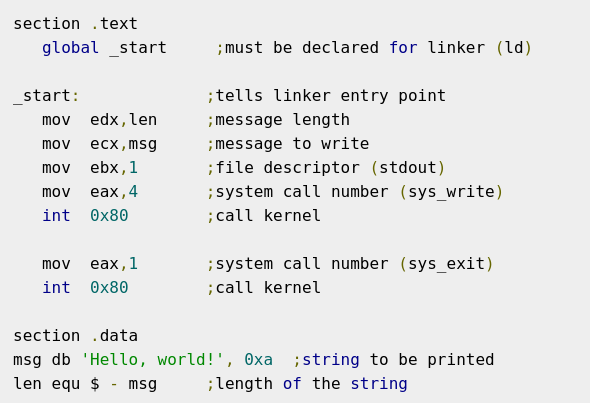
Step3
To assemble the program, type: nasm -f elf hello.asm in terminal. 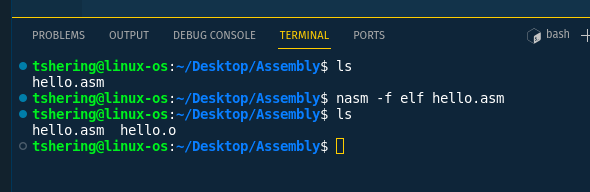
If there is any error, you will be prompted about that at this stage. Otherwise, an object file of your program named hello.o will be created.
Step4
To link the object file and create an executable file named hello, type: ld -m elf_i386 -s -o hello hello.o 
Step5
Execute the program by typing ./hello 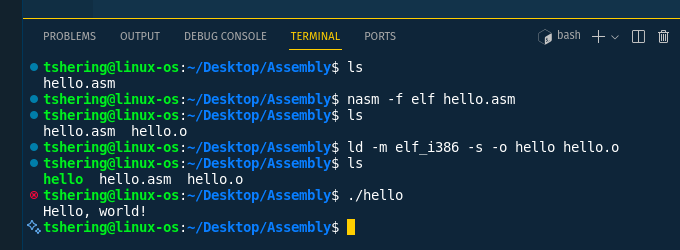
Instructions
An instruction in assembly language is a single operation that the CPU can execute. Each instruction tells the CPU to perform a specific task. Machine instructions generally fall into four categories: data movement, arithmetic, logic and control-flow.
Data movement
mov - Moves data from one place to another.
Examples;
mov eax, ebx ; copy the value in ebx into eax
mov byte ptr [var], 5 ;store the value 5 into the byte at location var
push - push instruction pushes a value onto the stack.
Examples;
push eax — push eax on the stack
push [var] — push the 4 bytes at address var onto the stack
pop - pop instruction removes (pops) the top value from the stack and places it into a specified register or memory location.
Examples;
pop edi — pop the top element of the stack into EDI.
pop [ebx] — pop the top element of the stack into memory at the four bytes starting at location EBX.
Arithmetic
add - Adds two values.
Example;
add eax, 10 ; add the value in 10 to eax
sub - Subtracts one value from another.
Example;
sub eax, 216 — subtract 216 from the value stored in eax
Logic
and - Performs a bitwise AND operation.
Example;
and ax, bx ; Perform bitwise and on ax and bx, store result in ax
or - Performs a bitwise OR operation.
Example;
or ax, bx ; Perform bitwise or on ax and bx, store result in ax
not - Perform a bitwise NOT operation.
Example;
not BYTE PTR [var] ; negate all bits in the byte at the memory location var.
Control-flow
jmp - Jump to a specific location in the code
Example;
jmp begin — Jump to the instruction labeled begin.
cmp - Compare the values of the two specified operands.
Example;
cmp DWORD PTR [var], 10 ; Compare the value at ‘var’ with 10
Registers
To speed up the processor operations, the processor includes some internal memory storage locations, called registers. In x86 assembly, there are a number of registers that hold data. These are like small storage spaces directly inside the CPU, allowing for quick access to the data they contain.
The registers are grouped into three categories;
- General registers Used for general arithmetic and data manipulation. e.g, AX, BX, CX, DX
- Control registers Used to control the operation of the CPU. e.g, IP/EIP/RIP
- Segment registers Used to hold segment addresses. e.g, CS, DS, ES, FS, GS, SS
When referring to registers in assembly language, the names are not case-sensitive. For example, the names EAX and eax refer to the same register. There are a lot more registers on x86-64 assembly.
Analyzing simple assembly code
Let’s analyze our earlier hello world program written in assembly language.
Here is the code:
Let’s go through this line-by-line.
There are two sections in the above assembly code that are .text and .data.
- global _start - This makes the _start label available to the linker as the entry point of the program.
- _start: - This is the entry point of the program.
- mov edx,len - Moves the length of the string len into edx.
- mov ecx,msg - Moves the address of the string msg into ecx.
- mov ebx,1 - Moves the file descriptor for stdout (1) into ebx.
- mov eax,4 - Moves the system call number for sys_write (4) into eax.
- int 0x80 - Calls the kernel to write the message.
- mov eax,1 - Moves the system call number for sys_exit (1) into eax.
- int 0x80 - Calls the kernel to terminate the program.
- msg db ‘Hello, world!’, 0xa - Define a byte string msg with the value “Hello, world!” followed by a newline character (0xa in hexadecimal, which is 10 in decimal).
- len equ $ - msg - Calculate the length of the string msg.
Extract assembly from a compiled program.
Extracting assembly code from a compiled program is a common task for reverse engineering or understanding how high-level code translates to machine code. This process is known as disassembly.
I am going to extract assembly code of a compiled c program. With 1 line of command that is : gcc -c -S
The gcc command in Linux is used to compile C and C++ programs.
Step 1
Write a simple c program and save it with .c extension 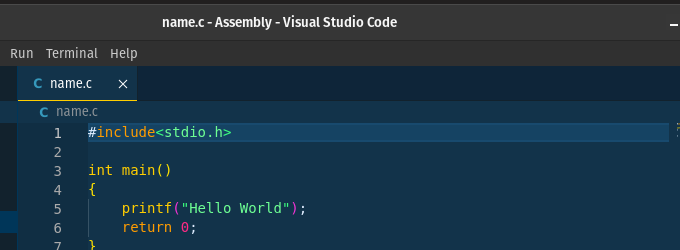
Step2
Open a terminal and type this command : gcc -c -S
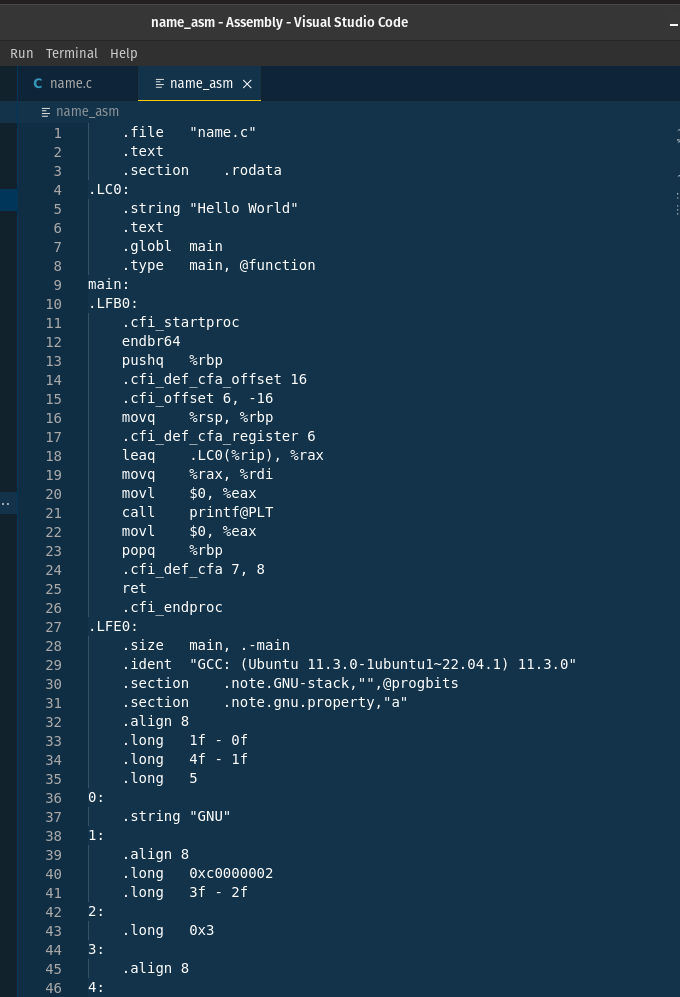
Conclusion
I have just touched the surface part of the assembly language, we have more to learn in depth. We can also get all the resources from the internet and learn assembly language in detail. By the way, I have also maintained this note by going through documentation and watching youtube videos. By getting basic knowledge from my journal, now you are well set to explore further more. Happy learning here after.