Sws101_flippedclass1
Topic: Networking
Computer networking refers to connecting computers and other devices to share resources and information.
Networking Devices
- Router: Connects different networks together.
- Switch: Connects devices within a local network.
- Hub: Connects multiple devices in a LAN but operates at the physical layer.
- Modem: Converts digital data from a computer into signals suitable for transmission over communication lines.
Topology
Topology refers to the way computers are arranged and connected to each other. It defines how data flows within the network.
Network topologies
- Point-to-Point
- Star
- Mesh
- Hybrid
- Bus
- Ring
- Tree
- Daisy Chain
Network Types
Wan(wide area network) Network that covers a large area and it is commonly referred to as the internet.
Lan(Local area network) Network that covers a limited area such as home, school, college, etc. It is a internal network.
wlan(wireless local area network) Type of local area network that uses wifi over wire. It is an internal network over wifi.
Vpn(virtual private network) Vpn allows connecting multiple network sides to one lan. There are three main types of vpn :
- site-to-site vpn
- remote access vpn
- ssl vpn
Proxy
A proxy is when a device or service sits in the middle of a connection and acts as a mediator.Without the ability to be a mediator, the device is technically a gateway, not a proxy. Key proxies:
- Dedicated Proxy / Forward Proxy
- Reverse Proxy
- Transparent Proxy
Networking model
The OSI (Open Systems Interconnection) Model and the TCP/IP (Transmission Control Protocol/Internet Protocol) Model are two common networking models that define the functions of a communication system.
OSI model(Open Systems Interconnection)
The OSI Model is a conceptual model that standardizes the functions of a communication or computing system into seven abstraction layers.
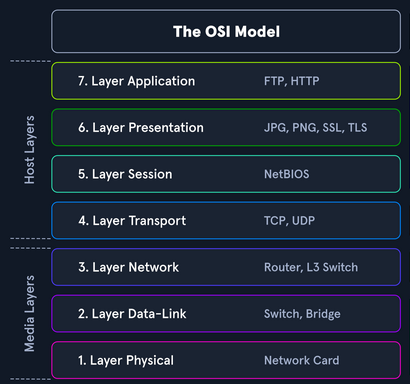
Seven Layers from bottom to top:
Physical layer Concerned with the physical connection between devices.eg Ethernet cables, USB, Bluetooth.
Data-link layer Responsible for creating a reliable link between two directly connected nodes.eg switch, bridge.
Network layer Focuses on routing and forwarding data packets between devices across different networks.eg router, L3 switch.
Transport layer Ensures end-to-end communication, providing error recovery and flow control. Eg TCP (Transmission Control Protocol), UDP (User Datagram Protocol).
Session layer Manages sessions or connections between applications. eg NetBIOS (Network Basic Input/Output System).
Presentation layer Translates data between the application layer and the lower layers. Eg JPG, PNG, SSL, TLS.
Application layer Represents the user interface and provides network services directly to applications. Eg FTP, HTTP, DNS.
Network Protocol
It is a set of rules that define how data is transmitted over a network. Protocol is like a common language that computers use to communicate with each other.
TCP/IP (Transmission Control Protocol/Internet Protocol)
The protocols are responsible for the switching and transport of data packets on the Internet. The Internet is entirely based on the TCP/IP protocol family. However, TCP/IP does not only refer to these two protocols but is usually used as a generic term for an entire protocol family.
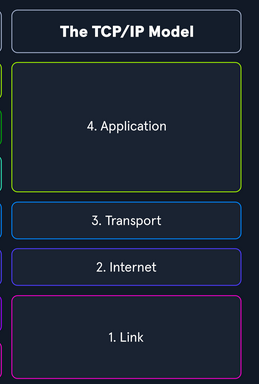
It consists of four layers:
Link Concerned with the physical connection between devices and the framing, addressing, and access control for the network medium.
Internet Responsible for logical addressing, routing, and the fragmentation and reassembly of packets.
Transport Equivalent to the Transport layer in the OSI model.
Application Facilitates communication between software applications and the network.
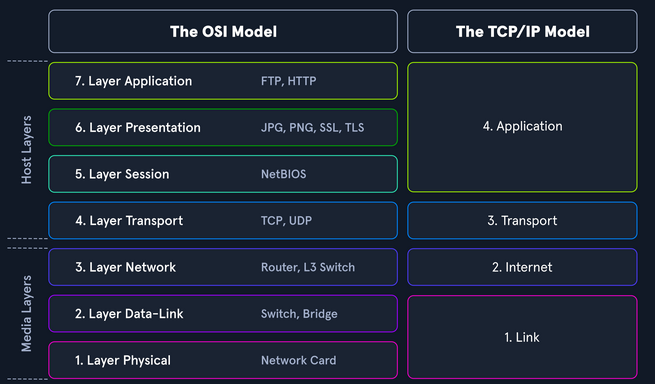
** Note that ** The OSI (Open Systems Interconnection) model and the TCP/IP (Transmission Control Protocol/Internet Protocol) model, although developed independently, can be loosely mapped to each other.
Link layer from the TCP/IP model is equivalent to the combination of the Physical and Data Link layers in the OSI model.
Network layer corresponds to the internet layer in the TCP/IP model. Transport layer corresponds to the Transport layer in the TCP/IP model.
Application layer from the TCP/IP model is equivalent to the combination of the Session, Presentation, and Application layers in the OSI model. The diagram below sum up my point;
Packet transfer
Packet transfer is the process by which data is broken down into smaller units called packets and transmitted across a network from a source to a destination.
In a layered system, devices in a layer exchange data in a different format called a protocol data unit (PDU).
Network layer
The network layer uses logical addressing (e.g. IP addresses) to uniquely identify devices on a network.
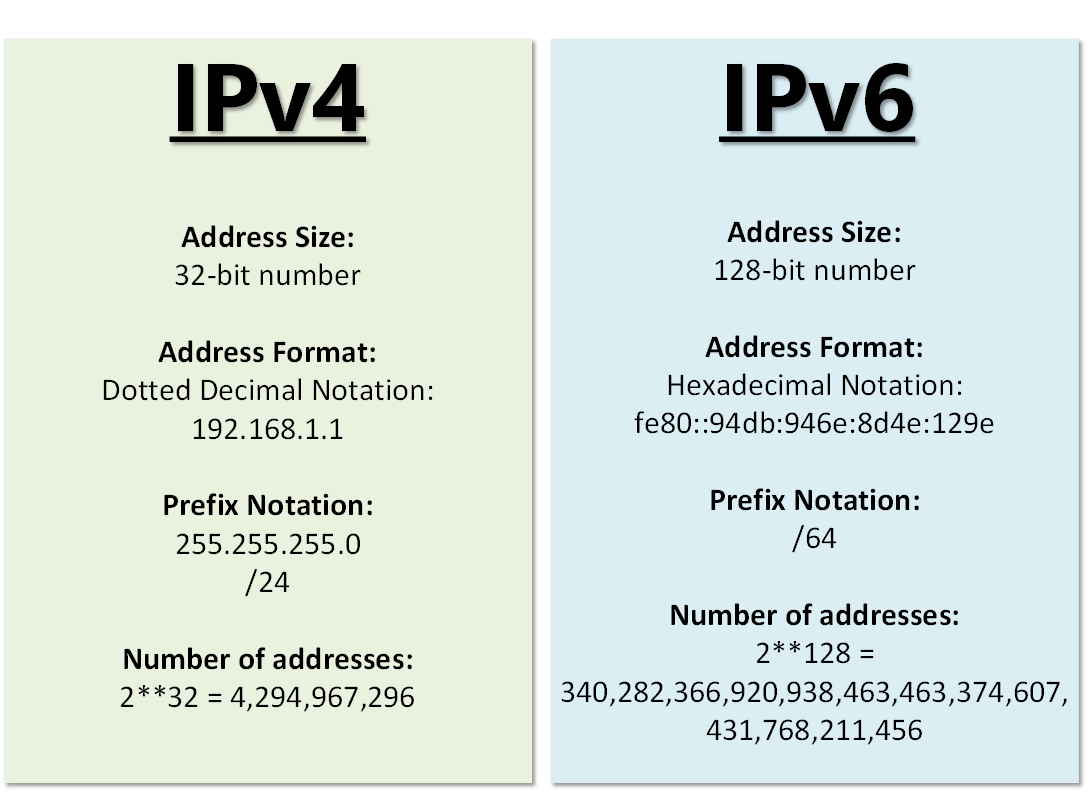
IPv4 vs IPv6
Subnetting
Subnetting is a networking technique that involves dividing an address range of IPv4 addresses into several smaller address ranges.
MAc addresses
A MAC (Media Access Control) address is a unique identifier assigned to network interfaces for communication on a physical network.
Each host in a network has its own 48-bit (6 octets) Media Access Control (MAC) address, represented in hexadecimal format.
TCP 3-Way Handshake
In the establishment of a TCP connection between a client and a server, a TCP three-way handshake process is performed.The three-way handshake is a fundamental process in establishing a reliable communication connection using the Transmission Control Protocol (TCP). It ensures that both the sender and receiver are ready for data exchange
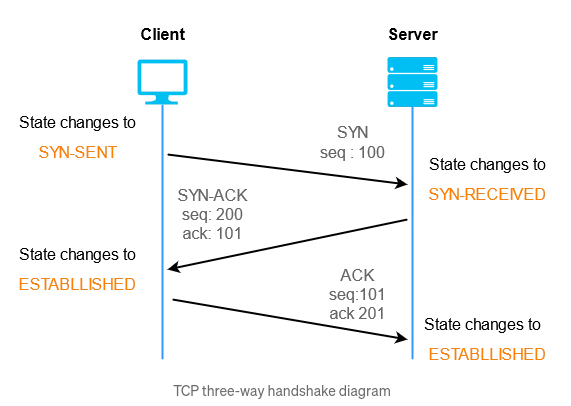
To understand the three way handshake better, let’s imagine Karma and Tshering want to exchange secret messages, and Karma wants to make sure the messages are delivered reliably.
- Hello Tshering (SYN):
- You send a message to your friend saying, “Hello Tshering, I want to talk to you.” This is like the first step, called “SYN” in computer terms which stands for synchronize. It’s your way of saying, “Let’s start talking.”
- Reply from Tshering (SYN-ACK):
- Tshering receives Karma’s message and responds, “Sure, I got your message, and I’m ready to talk too.” This is the second step, known as “SYN-ACK.” It’s like Tshering is acknowledging Karma’s request and saying, “Let’s have a conversation.”
- Okay, Let’s Talk (ACK):
- Karma then replies back to Tshering, saying, “Great! Let’s start our conversation.” This is the final step, called “ACK” (acknowledge). It’s KArma’s way of confirming that he got your friend’s response and that you’re both ready to exchange secret messages.
Wireless network
Wireless networks are computer networks that use wireless data connections between network nodes/hosts.
To connect to a wireless network, a device must be within range of the network and configured with the correct network settings, such as the network name and password.
Wireless networks use radio frequency (RF) technology to transmit data between devices.
VPN
A Virtual Private Network (VPN) is a technology that allows a secure and encrypted connection between a private network and a remote device.
IPsec
Internet Protocol Security (IPsec) is a network security protocol that provides encryption and authentication for internet communications.
PPTP
point-to-Point Tunneling Protocol (PPTP) is also a network protocol that allows the creation of VPNs and works by establishing a secure tunnel between the VPN client and server and then encapsulating the data being transmitted within this tunnel.
Topic: what i learned from over the wire bandit wargame
I have completed bandit wargame till level 20 -> level 21. It was a challenging game as I was just a beginner to terminal. In each level I learned a new terminal command.
Level 0
In this level we are provided with the host(bandit.labs.overthewire.org), port number(2220), Username(bandit0) and password(bandit0). We have to login to the game using shh(Secure shell). The Secure Shell Protocol (SSH) is a cryptographic network protocol for operating network services securely over an unsecured network. From this level I learned how to use ssh and what a port is. A port refers to a specific endpoint on a computer or network device that is used for communication. 1024 to 49151 are registered ports and 49152 to 65535 are dynamic or private ports. Command to login is ssh bandit0@bandit.labs.overthewire.org -p 2220
Level 0 -> level 1
In this level we have to find the password for the next level which is stored in the readme file. With the ‘ls’ command we can list the file in that directory. I ran ‘ls’ and saw there was a readme file so I ran command cat readme and got the password for next level(level1 -> level2). ‘cat’ command displays the content of the file.

Password for level 1 is NH2SXQwcBdpmTEzi3bvBHMM9H66vVXjL
Level 1 -> Level 2
From this level I learned to read the file that starts with dash(-). We have to use escape characters to open this kind of file. command is ‘cat ./-’
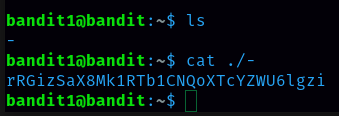
Password for level 2 is rRGizSaX8Mk1RTb1CNQoXTcYZWU6lgzi
Level 2 -> Level 3
From this level I learned to read the file that has spaces in the file name. We have to put the file name inside quotation marks to open this kind of file. command is cat ‘file name’.
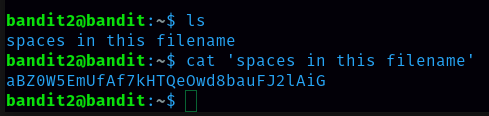
Password for level 3 is aBZ0W5EmUfAf7kHTQeOwd8bauFJ2lAiG
Level 3 -> Level 4
From this level I learned how to list the hidden file. With cd command I change my directory to inhere. Command to list hidden files is ‘ls -a’. I found a .hidden file and I ran ‘cat .hidden’ command to display the contents of the file.
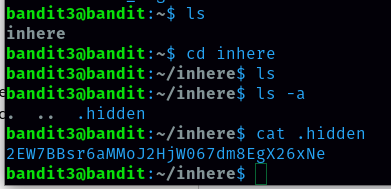
Password for level 4 is 2EW7BBsr6aMMoJ2HjW067dm8EgX26xNe
Level 4 -> Level 5
We are provided with the hint that password for the next level is stored in the only human-readable file in the inhere directory. There are many files inside the inhere directory so we have to use a loop that gives us information on the files to see which one is the human readable one. To do this I ran the command below: for x in {0..9}; do file ./-file0$x; done From this output i can say that password is in -file07 so with the command cat ./-file07 I got a password.
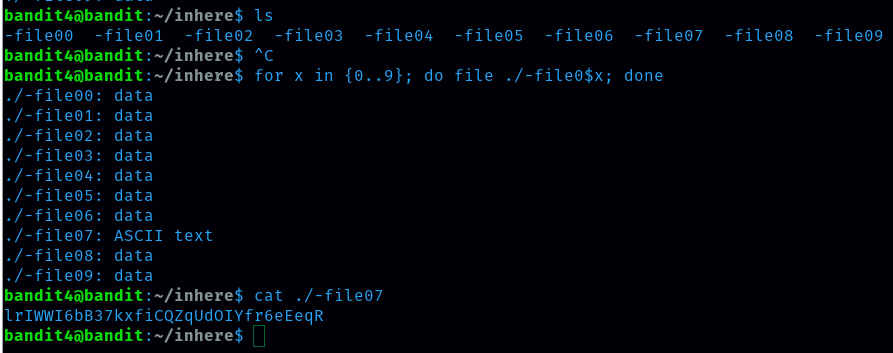
password for level 5 is lrIWWI6bB37kxfiCQZqUdOIYfr6eEeqR
Level 5 -> Level 6
From this level I learned how to use find commands. Hint says that password is stored in a file that is human-readable, 1033 bytes in size and not executable. Brute force is not a good technique so I used find command. command is ‘find . -type f -size 1033c ! -executable ‘. ‘ls’ command is not showing the dot file name which is hidden so to get .file2 we should use ls -a command.

Password for level 6 is P4L4vucdmLnm8I7Vl7jG1ApGSfjYKqJU
Level 6 -> Level 7
To solve this level i need to find the server that is owned by user bandit7 and group bandit6. So command is ‘find / -user bandit7 -group bandit6 -size 33c 2>/dev/null’ 2>/dev/null redirects error messages to null so that they do not show on stdout Note that we use . when we want to search in the current directory and / when we want to search the entire filesystem. We got the server file path which we can display it’s content with command ‘cat /var/lib/dpkg/onfo/bandit7.password’

Password for level 7 is z7WtoNQU2XfjmMtWA8u5rN4vzqu4v99S
Level 7 -> Level 8
The hint was that the password is next to the word millionth, so I used the command below to read the file and then grep the word millionth. Command is ‘cat data.txt | grep millionth’

Password for level 8 TESKZC0XvTetK0S9xNwm25STk5iWrBvP
Level 8 -> Level 9
Inside data.txt there is a lot of data. Hint says that password occurs only once that means it is unique so to get a password we have to sort for unique data. command is sort data.txt | uniq -u

Password for level 9 is EN632PlfYiZbn3PhVK3XOGSlNInNE00t
Level 9 -> Level 10
According to the hint, the file contains both strings and binary data which can make it difficult to read. In order to sort out the plain text the next part is to grep the lines that start with the = sign. So to do that command is ‘cat data.txt | strings | grep ^=’.
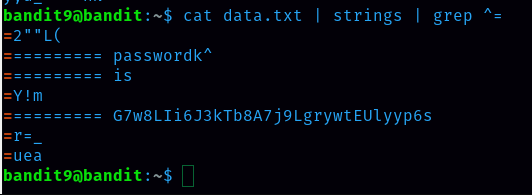
Password for level 10 is G7w8LIi6J3kTb8A7j9LgrywtEUlyyp6s
Level 10 -> Level 11
data.txt contains base64 encoded data so here we need to use base64 to decode base64-encoded data. command is ‘cat data.txt | base64 —decode’
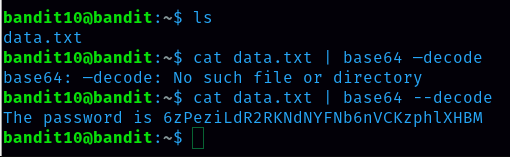
password for level 11 is 6zPeziLdR2RKNdNYFNb6nVCKzphlXHBM
Level 11 -> Level 12
command is cat data.txt | tr ‘[A-Za-z]’ ‘[N-ZA-Mn-za-m]’
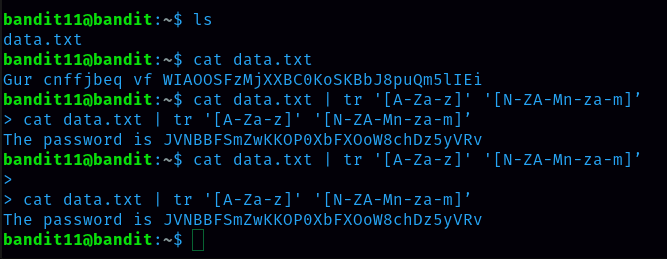
Password for level 12 is JVNBBFSmZwKKOP0XbFXOoW8chDz5yVRv
Level 12 -> Level 13
data.txt file is a hexdump which is repeatedly compressed. For this level we need to create a directory under /tmp in which you can work using mkdir. command is mkdir /tmp/tp12 (filename should be unique) Then copy the data file using cp, and rename it using mv. command is cp data.txt /tmp/tp12 we need to reverse the hexdump and save it into a file named karma. In order to decipher the hexdump of the file command is “xxd -r data.txt > karma” Then I ran file karma to see the compression method. when it is gzip compressed data i rename it to gzip and decompress it check again using file command when it is tar file i rename it to .tar and extract the file and see compression method if it is bzip2 i rename it to .bz2 and decompress it until i get ascii text.
Password for level 13 is wbWdlBxEir4CaE8LaPhauuOo6pwRmrDw
Level 13 -> Level 14
we need to login to user bandit14 and in the path /etc/bandit_pass/bandit14 there is the password. command to login is ssh bandit14@localhost -i sshkey.private -p 2220 Here we need to handle private SSH key files and use them for authentication.
Password for level 14 is fGrHPx402xGC7U7rXKDaxiWFTOiF0ENq
Level 14 -> Level 15
we need to connect to the local host on port 30000 and submit the password for level 14 to get the password for level 15 command to connect is nc localhost 30000 Nc means netcat
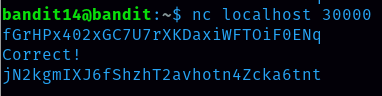
Password for level 15 is jN2kgmIXJ6fShzhT2avhotn4Zcka6tnt
Level 15 -> Level 16
command to open port 30001 on localhost using SSL encryption. is openssl s_client -connect localhost:30001 and then submit the pasword
Password for level 16 is JQttfApK4SeyHwDlI9SXGR50qclOAil1
Level 16 -> Level 17
As explained by the hint we have to find which host are up and running SSL. To do this we can run a nmap scan that will look check every port from 31000 to 32000 and check what services is running on that port 1st command is nmap -v -A -T4 -p 31000-32000 localhost 2nd command is openssl s_client -connect localhost:31790 then paste level 16 password and we get the private key. 3rd create a folder command is mkdir -p /tmp/filefor17 then cd /tmp/filefor17 create a file command is touch pvt.key and then open the file and paste that private key there command to open is nano pvt.key. 4th change the file permission with chmod 600 pvt.key command. 5th log into bandit17 with ssh bandit17@localhost -i pvt.key -p 2220 command There are two files password.new and password.old with many lines of possible passwords so remove the duplicate one . The command is diff password.new password.old and i got two passwords but both of them didn’t work . I remembered that in a previous level it said that all passwords are stored in the /etc/bandit_pass folder which I “cd” into and then I ran the “cat bandit17” command and I was able to get the password which I tried and I was able to login.
Passowrd for level 17 is VwOSWtCA7lRKkTfbr2IDh6awj9RNZM5e
Level 17 -> Level 18
Use the diff command to compare two files and identify differences. password for level 18 is hga5tuuCLF6fFzUpnagiMN8ssu9LFrdg
Level 18 -> Level 19
command is ssh bandit18@bandit.labs.overthewire.org -p 2220 cat readme password for level 19 is awhqfNnAbc1naukrpqDYcF95h7HoMTrC
Level 19 -> Level 20
command is ./bandit20-do and the output says to use ./bandit20-do id(run a command as another user) cat bandit20 as ./bandit20-do cat /etc/bandit_pass/bandit20
password for level 20 is VxCazJaVykI6W36BkBU0mJTCM8rR95XT
Level 20 -> Level 21
we have to open two terminal and login to bandit20 In one terminal command we should run is nc -lvp 9999 and in another terminal command that we should run is ./suconnect 9999 then in the earlier terminal we should paste level 20 password and then we receive level 21 password.
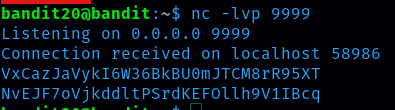
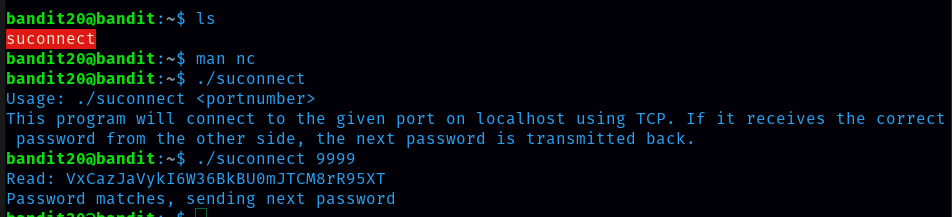
password for level 21 NvEJF7oVjkddltPSrdKEFOllh9V1IBcq
The Bandit Wargame has not only elevated my proficiency in Linux command-line operations but has also instilled confidence in tackling security-related challenges.